



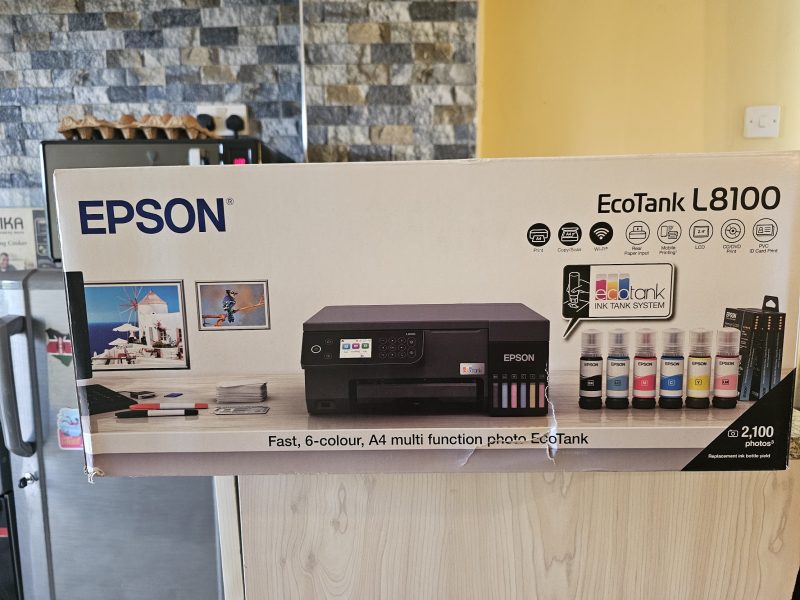
The Epson EcoTank L8100 occupies an interesting middle ground among printers. Priced between KES 63,000 and 70,000, depending on the retailer, it is a six-colour all-in-one printer designed for individuals who desire photo-grade quality but can’t justify the high running costs of traditional cartridge models. It targets small offices, studios, and creative users who frequently print and prioritise long-term cost control. The result is a printer that sacrifices speed for precision and affordability in the long run.
Design and build
The L8100 feels solid and compact, although it may not be too compact for some users. Epson has integrated the ink tanks into the main body, rather than leaving them hanging off the side, as in earlier models. This keeps the footprint small and the setup cleaner.
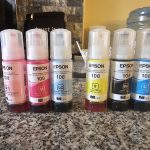
Each tank has a unique port that only accepts its corresponding bottle, eliminating the risk of ink mixing. Filling is automatic once the bottle is plugged in and stops when the bottle is full. It is quick, clean, and just works. I liked this feature a lot.
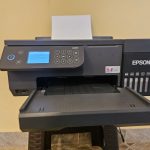
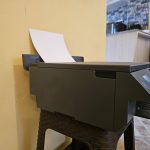

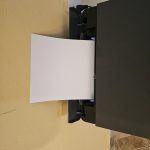
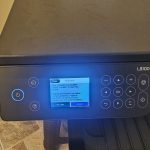
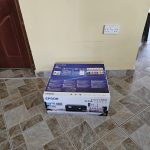

The printer features Wi-Fi and Wi-Fi Direct, allowing you to print from phones, laptops, or desktops without a wired connection, provided both the printer and your devices are connected to the same network.
The setup process through the Epson Smart Panel app is straightforward. The app (I used an Android phone for this test) guides you through connecting the printer to a network and handles most of the configuration that once required a computer. It is really that simple.
Six-colour system
What makes the L8100 stand out, at least to me, is its six-colour dye-based ink set: Black, Cyan, Magenta, Yellow, Light Cyan, and Light Magenta. The two lighter inks fill in the tonal gaps that standard four-colour printers struggle with, especially in skin tones, skies, and shadows. They allow smoother gradients and fewer visible dots. The result is a photo output that looks consistent and natural, even on glossy paper (although it struggled with images with a lot of light on people’s faces).
Print resolution peaks at 5760 x 1440 dpi. When you print a high-resolution photo, every detail appears clearly. But that level of precision comes at a cost, which is time.
A single borderless A4 photo can take several minutes to complete at maximum quality. It’s not ideal for speed printing, but it fits well for professional or personal use where quality matters more than volume.
The tech behind the L8100
Epson uses its MicroPiezo printhead powered by Heat-Free Technology. Unlike thermal inkjets that heat ink to form droplets, this system relies on mechanical pressure. Because it runs cold, it consumes less power, about 19W during operation and less than 1W in sleep mode. It also starts printing almost immediately when turned on, since there’s no warm-up phase.
The lack of heat also means less wear on the printhead. Epson backs it with a two-year or 50,000-page warranty, which is generous for this price class. Printheads are often the most expensive part to replace, so having that covered makes the printer more appealing to heavy users.
Everyday use
The L8100 isn’t only for printing, as it can also scan and copy using a 1200 x 4800 dpi contact image sensor, suitable for digitising photos or documents. Copying speeds average around seven pages per minute. The flatbed design limits it to single sheets, but quality remains high for colour copies and scanned images.
The printer supports borderless A4 printing and has a rear feed slot for thicker media such as fine art paper. The straight feed path prevents curling and scratching on delicate stock. The printer also handles direct printing onto PVC ID cards and CDs or DVDs, useful for small studios, photographers, or event organisers.
The control panel is clear, with a simple layout that allows direct USB printing from storage drives or quick copying without a computer. I did not test this since I printed most of my stuff from phone.
Balancing quality and speed
Speed, in my opinion, is the only clear trade-off for this printer. Standard documents print at about 8 pages per minute, which is fine for light office work. But photo printing slows considerably when set to the highest quality. The delay is caused by the printer making more passes with smaller ink droplets to maintain sharpness and even colour.
You can adjust a few settings to make it faster.
- Enable bidirectional printing so the printhead works both ways instead of in one direction.
- Turn off Quiet Mode, which reduces mechanical movement to minimize noise.
- Drop the print quality from “High” to “Standard” when printing proofs or draft images.
These changes reduce print time without much visible quality loss for casual use. Users often mistake slow printing for a problem, but it’s a deliberate design choice for photo precision.
Software and colour control
On Android, the Epson Smart Panel app offers a good experience that I actually liked. It lets you print, scan, check ink levels, and troubleshoot directly from your phone. The app layout is clean and intuitive. You can customise the tiles on the main screen for quick access to your most used actions. Remote printing from Google Photos or file managers works smoothly, though large photo files can take time to process.
The desktop driver provides deeper control. Professional users can manage colour profiles, brightness, contrast, and saturation manually. If you work with editing software such as Adobe Photoshop or Lightroom, you can disable the printer’s internal colour correction (“No Colour Adjustment”) and let your software handle it. This ensures the final print matches the calibrated colour of your screen.
For everyday use, there’s a “Fix Photo” tool that automatically adjusts colours and contrast. It works fine for quick prints but can interfere with colour-critical work, so it’s best left off when accuracy matters.
Epson’s software also supports firmware updates through the Epson Software Updater. If an update fails, the printer goes into Recovery Mode so you can retry safely via USB without bricking the device.
For the ten days I had the printer, it received one software update, which took about 5 minutes to download and install.
Maintenance and running cost
This is where the L8100’s EcoTank system proves its worth. Epson claims that each ink bottle can print thousands of pages, bringing the per-page cost down to a fraction of what cartridge printers charge. Even heavy users rarely need to refill more than once or twice a year.
Epson includes a user-replaceable maintenance box that collects waste ink from cleaning cycles. When it’s full, the printer alerts you to replace it. I am not sure how much the box costs, but i can make an educated guess that it is a small price to avoid a service visit. There’s also a replaceable paper pickup roller, another part that wears out over time. Being able to handle these replacements yourself means less downtime and lower service costs.
The total cost of ownership is where the L8100 wins. It’s not cheap upfront, for sure, but over time, it pays off. With ink refills priced low and most maintenance done in-house, it offers one of the lowest running costs in its class.
Reliability and support
The printer’s warranty covers both the body and the printhead for two years or up to 50,000 pages. For most users, that’s well beyond normal use. It’s a confident warranty that reflects the durability of Epson’s piezo technology.
Users printing in bulk should keep a spare maintenance box on hand to avoid interruptions. Epson’s warning system is accurate but offers little grace period once the box reaches its limit. Replacing it is simple, just open the rear panel, swap the box, and you’re back online.
Thoughts
The Epson EcoTank L8100 delivers strong results for anyone who prints photos regularly or handles mixed media work. The six-colour setup produces smooth tonal transitions and consistent photo quality that rivals dedicated photo printers. It’s reliable, cheap to maintain, and versatile enough for ID card or fine-art printing.
Its weak points are speed and its lack of automatic duplex printing. You’ll wait longer for each photo, and it’s not built for fast office output. But that’s part of its trade-off for precision. If you understand that balance, the L8100 performs exactly as it should.
On Android, the Smart Panel app complements the printer well. It offers real control and insight without being bloated or slow. Setting up Wi-Fi, checking ink levels, and initiating scans all work seamlessly from a phone. It’s a solid mobile companion for users who don’t always rely on a desktop.
For small studios, photographers, and creative professionals looking to print high-quality photos at low ongoing cost, the L8100 is a sound choice. It’s not built for speed, but it is built to last. Its real value lies in consistent output, affordable upkeep, and a design that lets users handle most maintenance themselves.